


Application Instructions
Registration
Registration website:http://study.wzu.edu.cn
The page is as the picture below. Please click the button at the upper right corner to shift the language (Chinese/English).
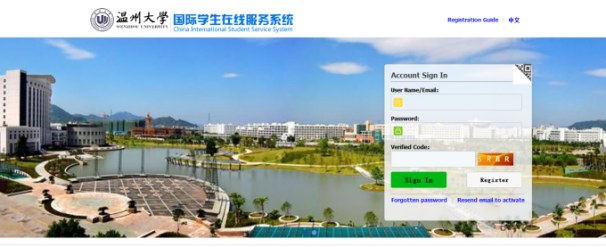
Registration button is on the right side:
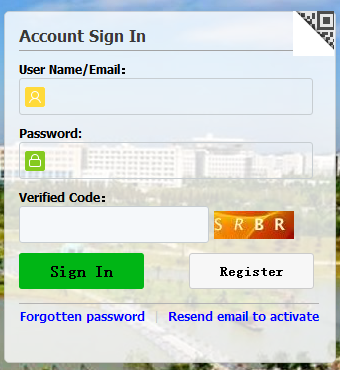
1.1 User Registration
Click“Register” and fill in all information as in the picture below:.
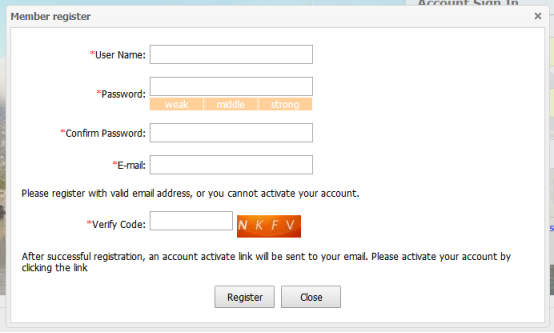
Attention: “﹡”means compulsory. The registration could not be submitted if it is empty! Attention: E-mail must be authentic. It is the only way to retrieve the password so please write an authentic one and remember it!
User Name should be registered with your Student ID!
Click the button “Register” and complete user registration.
1.2 Receiving the email
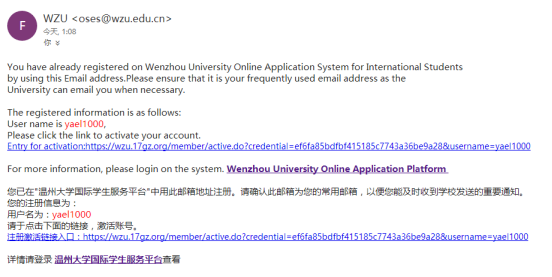
After registration, you need to enter the email you have used for registration to check user name and password, and click the activation link to activate your account. Please see below:
2 Sign in
Open the page and fill in the user name, password and verified code. Click on “Signin”.
3 Password change & retrieving
change password
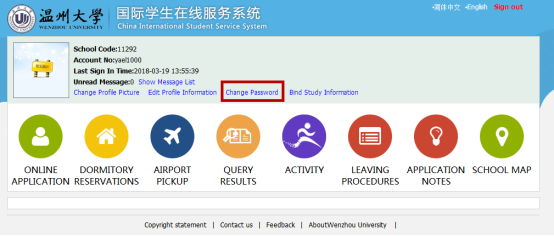
Sign in the home page and click “change password” as in the picture below:
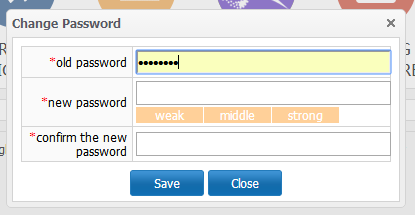
Fill in the old password and the new one, and then click“save”.
Retrieve password
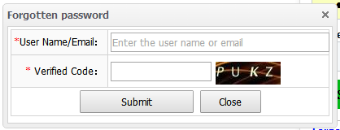
Click“Forgotten password”in the sign in page, fill in user name/e-mail and verified code and click “submit” as in the picture below:
4 Resend activation email
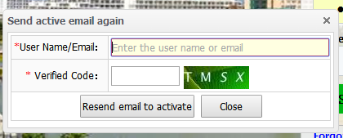
Click“Resend email to activate”, fill in user account or email, password and verified code, and click “Resend email to activate” in the pictures below:
5 Application
5.1 Enter the application page
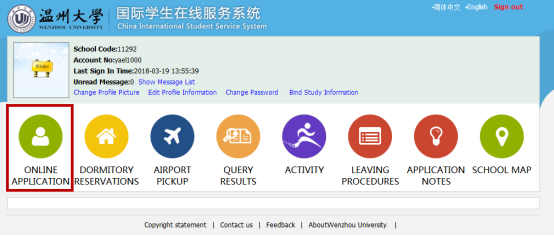
Enter the application home page after signing in. Click “Online Application” to enter application page as in the picture below.
5.2 Choose program
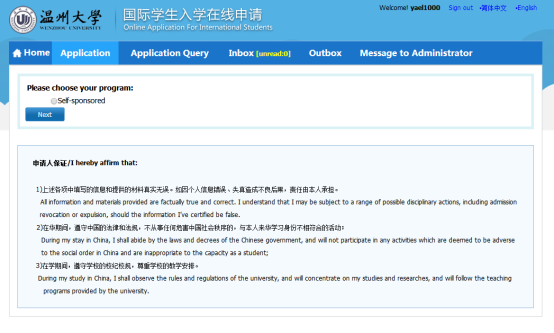
5.3 Choose your type
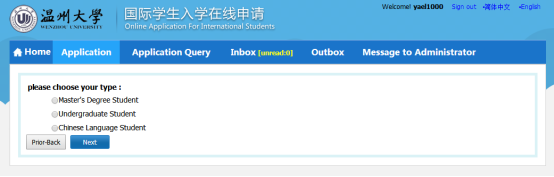
5.4 Choose study plan
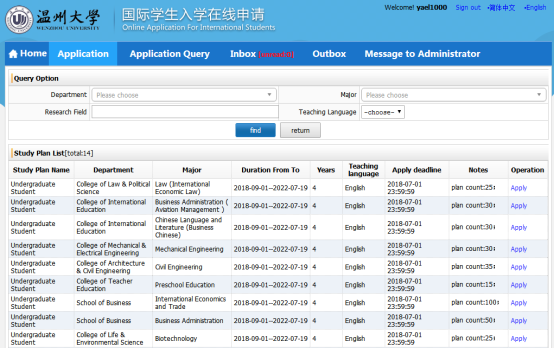
Choose the program you want to apply for, or search for it: fill in query option information (department, research field, major, teaching language) and click “Find”. There will be programs that meet the query information.
Please choose the program you want to apply for and click“Apply”on the right side as in the picture below:
5.5 Fill in information
5.5.1 Fill in basic information
Fill in basic information as required in the picture below.
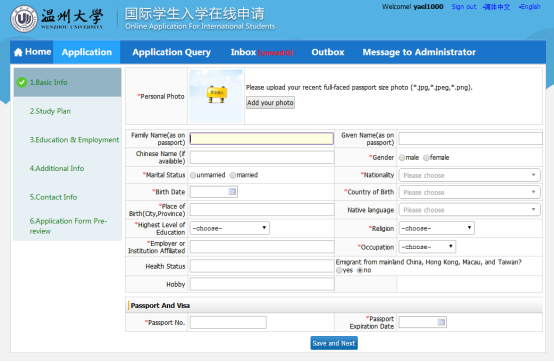
Please note that “*” means compulsory;if it is not filled then the application could not be saved. When fill in nationality, country of birth, native language, religion and occupation, students need to click the upside-down triangle on the right of the box and choose from the drop-down list; nationality and country of birth could also be typed in the box and push enter to confirm; for birth date please select year, month and day in the calendar and click “ok”.
Please check the information filled in carefully(name as on passport, gender, date of birth, nationality, place of birth and passport number).
For personal photo please click “Add your photo”, choose the local photo and click “open” to upload (the photo uploaded should be passport size and the format should bejpg, jpeg, png).
5.5.2 Fill in Study Plan
Fill in the study plan as required. Click “Save and Next” when finish as in the picture below:
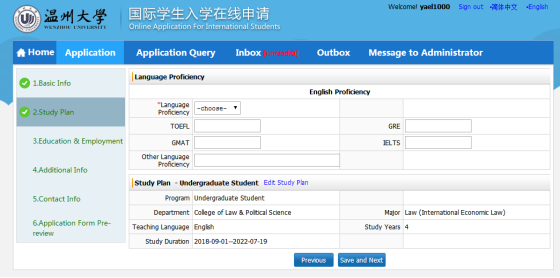
5.5.3 Fill in Education & Employment
Fill in educational background as required.
There should be at least three items in educational background and employment information. If there are more than three items, please click “add” to add more items.
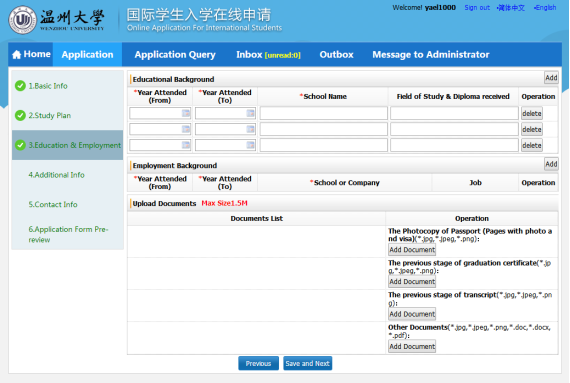
Please note:
☆Please upload all documents required by the program you apply for (the photocopy of passport pages with photo and address, graduation certificate, transcript, passport or ID card of guardian, guardian guarantee and others). All documents should be no more than 1.5M.
☆Please only submit the application after all required documents are uploaded.
All documents uploaded should be authentic and should not be substituted by other documents. Otherwise the application would be regarded as invalid.
●Passport photo page and address page
Please upload the photocopy of passport photo page or address page. If the applicant does not have a passport, please upload the required document after obtaining one.
It should not be substituted by any other document. Otherwise the application would be regarded as invalid.
●Passport or ID card of guardian
All applicants should upload the photocopy of the passport photo page or address page, or the photocopy of ID card of the guardian. The “guardian” should be person with income (hence should not be a student). If necessary, the university would contact the “guardian” about issues concerning the student during study.
5.5.4 Fill in other information
Please fill in family status,financial supporter and emergency contact as in the following picture.
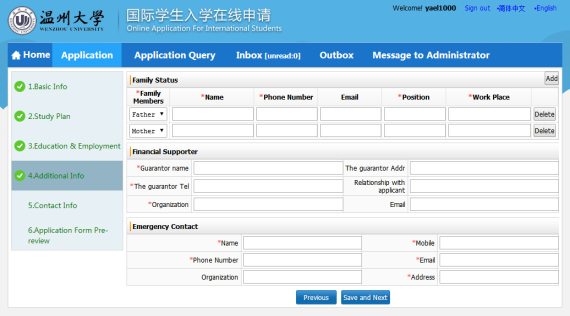
You may click “Add” to add items in family status. Please click “Save and Next” after filling in for next step.
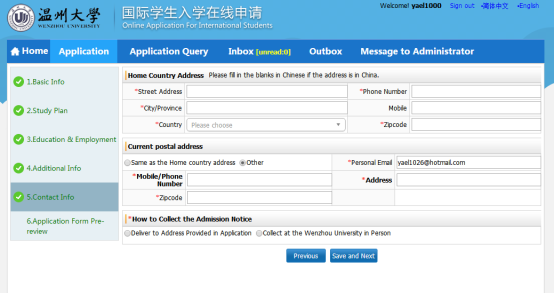
5.5.5 Fill in contact information (very important)
Please fill in home country address, current postal address and the wayto collect admission notice. If the applicant chooses to have admission notice delivered to the address provided in application, the address could be copied from home country address or current postal address, or filled in the boxes.
Please note:In “How to Collect the Admission Notice”, please choose “Deliver to Address Provided in Application” or “Collect at the Wenzhou University in Person”.
☆If you choose “Deliver to Address Provided in Application”, please fill in with care the information (click “Copy from Home Country Address” or“Copy from My Current Postal Address”or type) so as to make sure the applicant shall receive the admission notice in time.
☆If you choose “Collect at the Wenzhou University in Personal”, then it means the admission notice does not need to be delivered, and the applicant will come to the Overseas Students Affairs Office in person to get admission notice.
☆Exchange students must submit detailed contact information for receiving their admission notice (should be contact information of their home university department in charge of outbound exchange student affairs) including: contact person, mailing address, zip code, telephone number, and email address.
Click“Save and Next” to move to“Application Form Pre-review”.
5.5.6 Application FormPre-review
Applicants may review the filled information as in the following picture.
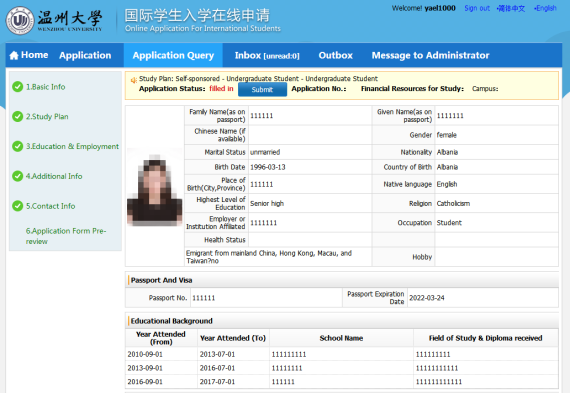
If there is any mistake you may click the corresponding steps on the left to correct it.
If all information is correct, please click “Submit”. Please note that the information is not to be changed after submission. Therefore make sure the information is correct and the required documents are uploaded before submission.
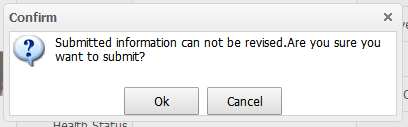
6. Pay attention to application status ande-mail
Please pay close attention to“Inbox” and the email used for registration as in the following picture.
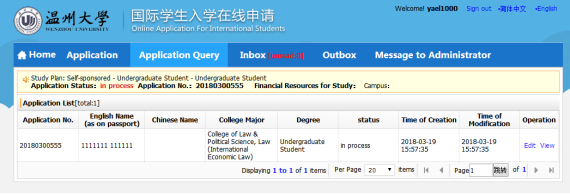
If there is any problem for the application or more documents are needed,we will contact via email to correct or add.
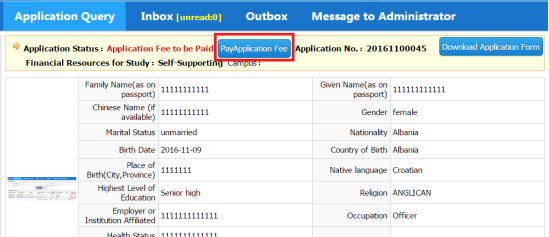
The applicant may also inquire application status from“Application Query”.
If the applicant passed the first review, the next step will be paying the application fee (whether exchange students need to pay the application fee should be in accordance with the agreement). Please pay application fee in time (it could be paid by Chinese bankcard or International credit card).
7 Tips
☆Every applicant should submit only one application. If there is any mistake in application please contact us (admission@wzu.edu.cn) to change. Please do not re-submit application.
☆If there is any problem concerning application system, please contact:
E-mail:admission@wzu.edu.cn Tel:0086-0577-86680971
☆Address for Overseas Students Education & Service: Room118, Student Center, North Campus, Wenzhou University, Chashan University Town, Wenzhou City, Zhejiang Province,China 325035